
Overview
TEAM is the acronym for the CMS Transforming Episode Accountability Model. TEAM will focus on improving quality and reducing variation in five specific episode categories:
- Coronary Artery Bypass Grafts
- Major Bowel procedures
- Lower Extremity Joint Replacements
- Surgical Hip and Femur Fracture Treatments
- Spinal Fusions
Trella Health has implemented features and metrics into Marketscape Insights that will help you to evaluate a hospital by focusing on the specific patient population aligned with one of the five episode categories. This article will provide summaries of the tools and metrics related to TEAM and show you where to find those tools in Marketscape Insights.
 In this article
- Where to Find TEAM Metrics and Tools
- Explore page - TEAM filters and metrics on the Explore page
- Analyze page - TEAM tables and filters on the Analyze page
- Links - Links to the complete articles that provide context for the TEAM features
Where to Find TEAM Metrics and Tools
TEAM related features can be found on two pages in Marketscape Insights for Home Health, Hospice, and Skilled Nursing. The locations are described in this section, and the details are below this section
Explore Page
|
TEAM filters and metrics are found on the Facilities Explore page in Home Health or Hospice, and on the Hospitals & Agencies Explore page in Skilled Nursing
|
 |
| |
|
Home Health and Hospice Two filters and two metrics |
 |
|
Skilled Nursing Two filters and two metrics |
 |
 For more information, see the list of compete articles in the Links section.
Analyze page
| The most common way to open an Analyze page in Marketscape Insights is to click on the name of a provider in a table on another page. For example, after finding a provider of interest in the Explore page table, click on the name of that provider and the Analyze page will open. |  |
|
TEAM metrics can be found under two tabs on a Facility Analyze page. Three tables under Utilization and Quality Destinations |
 |
For more information, see the list of compete articles in the Links section.
 |
Explore page
In Marketscape Insights, on the Explore page, under each tab, there is a single table that displays all providers, post-acute facilities, referrers or suppliers in the states for which your company has a contract. TEAM metrics can be found on the Facilities page for home health and hospice, or the Hospitals & Agencies page for Skilled Nursing.
There are two filters for TEAM metrics and two columns of metrics related to TEAM. The following image shows the two filters at the top and the columns from the table below.
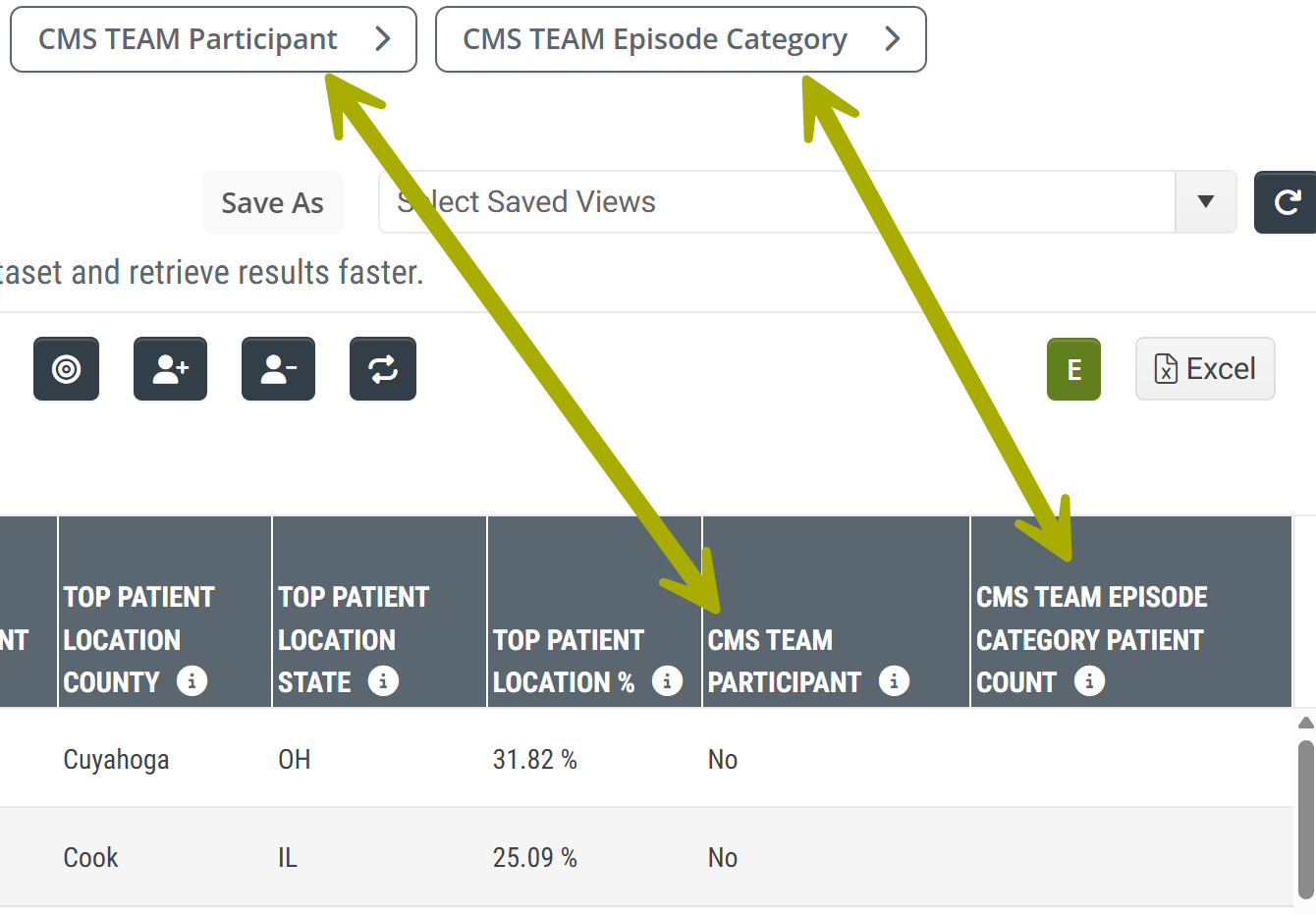
Filters
The two TEAM filters allow you to filter the entries in the table so you can focus on organizations aligned with TEAM and focus on one of the five specific episode categories.
|
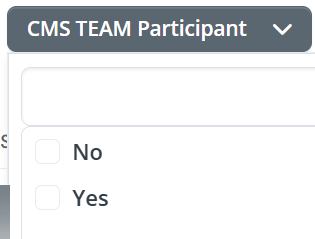
CMS TEAM Participant - Use this filter to show either orgs that are participating with the TEAM initiative or those that are not. Choose "Yes" to have TEAM participants shown in the table. |
 |
|
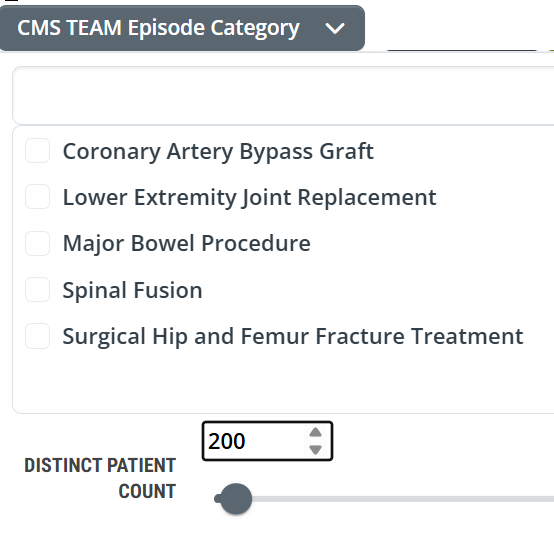
CMS TEAM Episode Category - When you choose one of the TEAM episode categories for the filter, the metrics in the table will show patient counts and performance metrics only for patients whose treatment aligned with the category you selected. Choose one option. The filter includes a patient count range filter so you can choose a useful minimum patient count. Choosing a minimum number, like 200 as shown in the sample image, will limit the entries in the table to facilities that treated at least that many patients who aligned with the selected TEAM category. |
 |
For more information, see the list of compete articles in the Links section.
Metrics
The two columns of TEAM metrics align with the two filters shown above
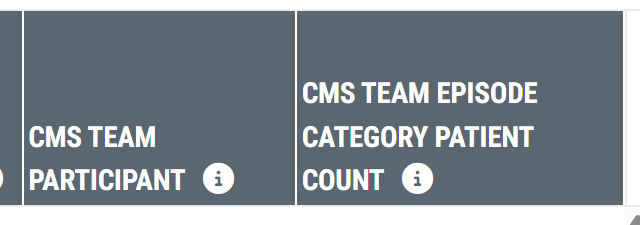 | |
| CMS TEAM Participant | Identifies facilities that are participants in the Transforming Episode Accountability Model (TEAM), program. |
| CMS TEAM Episode Category Patient Count |
If you use the TEAM Episode Category filter to select a TEAM Episode Category, this column will show the count of distinct patients discharged from the listed facility with an inpatient MS-DRG associated with the selected TEAM Episode Category during the two-year reporting period. If the filter is not used, this column will be blank. |
For more information, see the list of compete articles in the Links section.
|
Analyze page
TEAM elements show up under two tabs on the Facilities Analyze page.
| The TEAM features for each tab are shown below | |
Utilization & Quality tab |
Destinations tab (Coming Soon) |
|
|
Episode Category Table
The CMS TEAM Episode Category table provides metrics for the selected facility with a focus on the five TEAM episode categories. At a glance, you will be able to determine the volume of patients treated by the selected facility for each of the five TEAM episode categories along with length of stay metrics and readmission rates.

Metric Summary
- TEAM Episode Category - this column shows the Transforming Episode Accountability Model (TEAM) Episode Category for which the metrics in the same row are calculated
- Distinct Patient Count - the metrics in this column are counts of distinct patients discharged with an inpatient MS-DRG associated with the listed TEAM episode category during the two-year reporting period
- Percentage of Patients - the percentage of patients discharged with an inpatient MS-DRG associated with any of the five TEAM episode categories who were discharged with an inpatient MS-DRG associated with the TEAM episode category listed in the row. This metric is calculated for the two-year reporting period
-
 This metric is calculated from all patients discharged from the selected facility with an inpatient MS-DRG that aligns with a TEAM episode category.

- Discharge Count - the metrics in this column are the counts of stays discharged with an inpatient MS-DRG associated with the listed TEAM Episode Category during the two-year reporting period. The count of stays can be higher than the count of distinct patients if some patients were discharged from multiple stays within the reporting period.
- Average Length of Stay (Inpatient) - the average length of stay (in days) spent in this hospital for patients discharged with an inpatient MS-DRG associated with the listed TEAM Episode Category during the one-year reporting period. County and state lengths of stay are provided for comparison.
For more information, see Average Length of Stay.
- Readmission Rate - the percentage of patients discharged with an inpatient MS-DRG associated with the listed TEAM Episode Category during the two-year reporting period who were readmitted to a hospital within 30 days of discharge from the selected facility.
For more information, see the list of compete articles in the Links section.
|
Discharge Events by Setting filter
The Discharge Events by Setting table shows the spread of inpatient discharge events and the outcomes for those patients as they moved on to additional post-acute care.

|
The dropdown at the top left of the table allows you to choose one of the five TEAM Episode categories. Selecting a specific category will limit the metrics in the Discharge Events by Setting table to discharges from the selected hospital that align with the selected chosen category. Click on a single option from the dropdown list. |
 |
For more information, see the list of compete articles in the Links section.
|
Outcomes by Setting: Inpatient filter
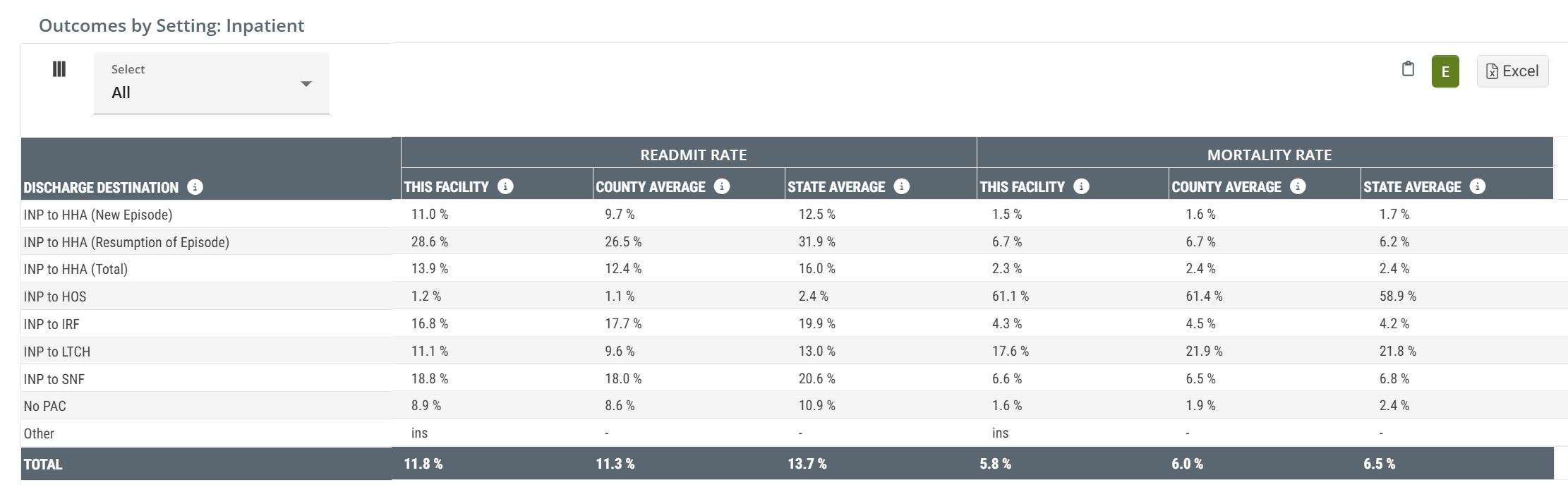
The Outcomes by Setting: Inpatient table provides several insights into the post-acute care provided to patients discharged from the selected facility. Readmit rates and mortality rates are calculated for several different post-acute destinations with county and state averages available as benchmarks for comparison.
|
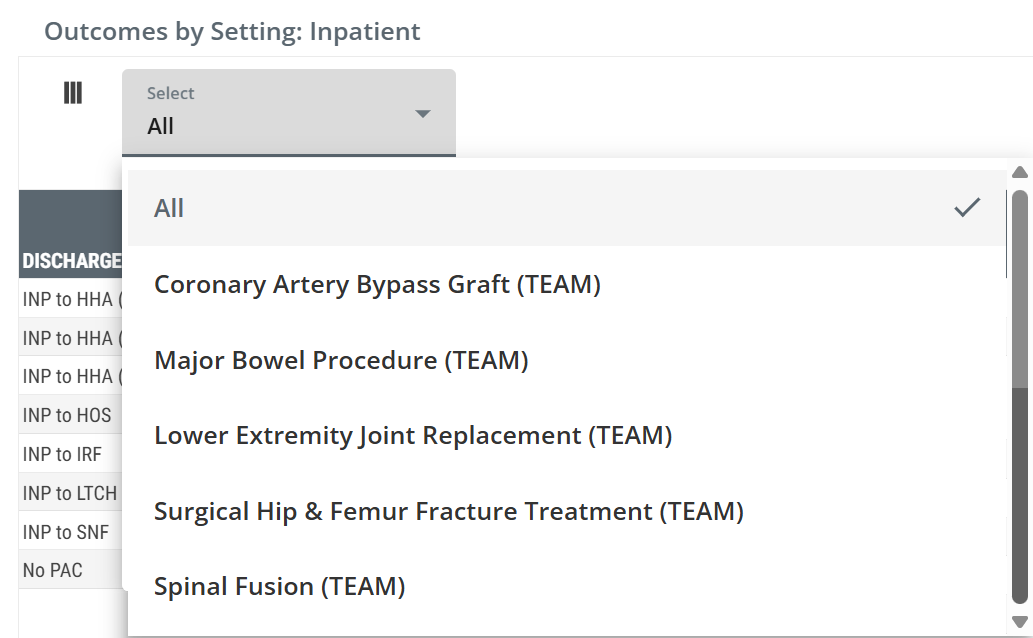
The dropdown at the top left of the table allows you to choose one of the five TEAM Episode categories. Selecting a specific category will limit the metrics in the Outcomes by Setting: Inpatient table to discharges from the selected hospital that align with the chosen episode category. Click on a single option from the dropdown list. |
 |
For more information, see the list of compete articles in the Links section.
|
Destinations Tab
The Destinations tab is where TEAM episode data becomes actionable for post-acute providers. The Claim Type dropdown on the primary Destinations table in each product includes the five TEAM episode categories as selectable options — the FFS Home Health Destinations table in Marketscape Insights for Home Health, the Hospice Destinations table in Marketscape Insights for Hospice, and the FFS SNF Destinations table in Marketscape Insights for Skilled Nursing. When you choose a TEAM episode category, the table filters to show only patients whose Medicare FFS claims were aligned with that episode — so instead of seeing all post-acute referrals from the selected hospital, you see only the patients in the episode type you care about, ranked by which agencies are receiving them. The TEAM episode categories appear on the Facility Analyze page in Marketscape Insights for Home Health and Hospice, and on the Hospital & Agency Analyze page in Marketscape Insights for Skilled Nursing.
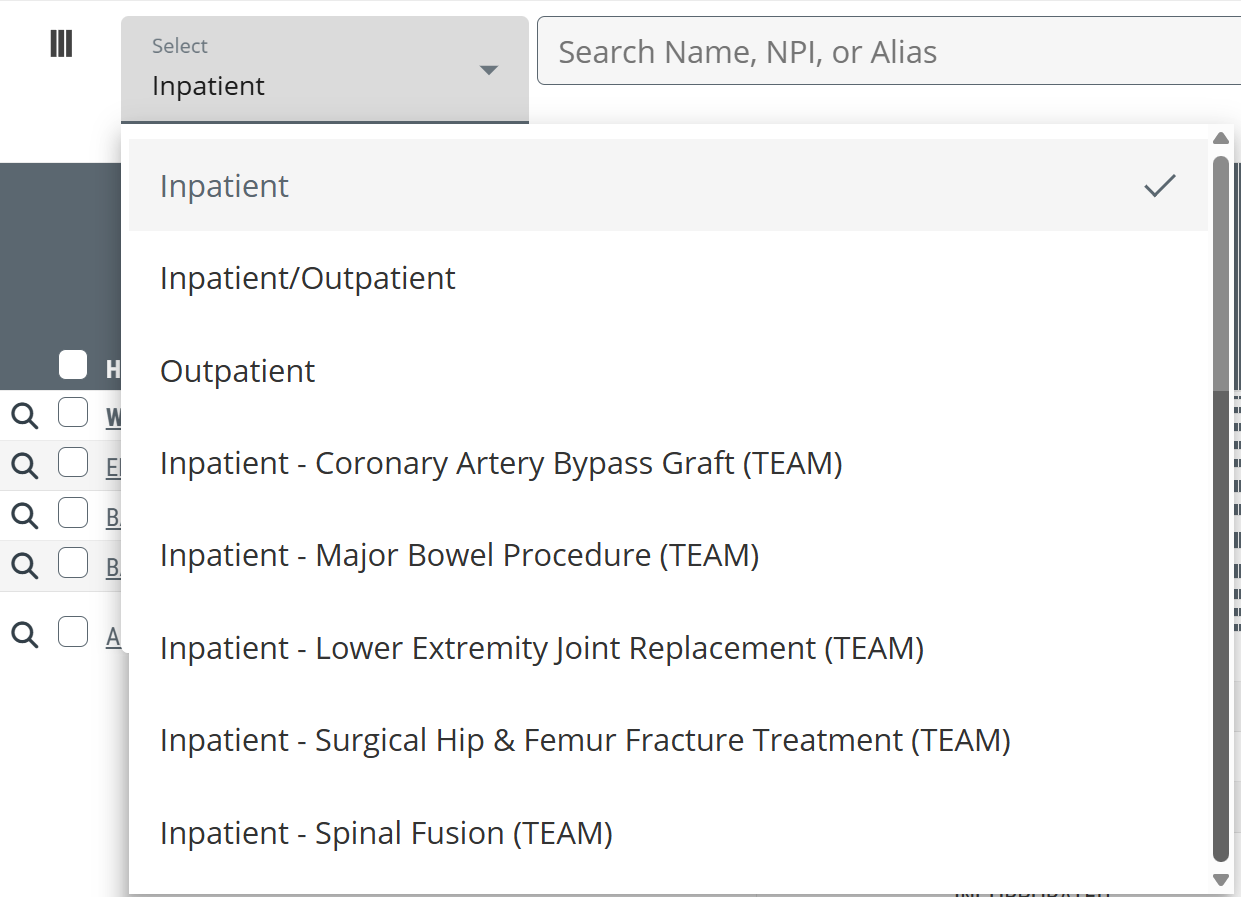
For more information, see the list of compete articles in the Links section.
|
Links
Use the following links to learn about these filters and metrics in their broader context.
- The Explore page - a general introduction to the Explore page
Marketscape Insights for Home Health
- Exploring Facilities - The details of the Facilities Explore page in Marketscape Insights for Home Health
- Marketscape Insights for Home Health - Facilities Explore page Filters - Details on filters specific to the Facilities Explore page
- Discharge Events by Setting - Detailed view of the Discharge Events by Setting table
- Outcomes by Setting: Inpatient - Detailed view of the Outcomes by Setting: Inpatient table
- Utilization and Quality tab - Details of the tables and metrics on the Utilization & Quality tab
- Facility Analyze page - Destinations tab - Claim Type dropdown includes TEAM options
Marketscape Insights for Hospice
- Exploring Facilities - The details of the Facilities Explore page in Marketscape Insights for Hospice
- Marketscape Insights for Hospice - Facilities Explore page Filters - Details on filters specific to the Facilities Explore page
- Discharge Events by Setting - Details of the Discharge Events by Setting table
- Outcomes by Setting: Inpatient - Details of the Outcomes by Setting: Inpatient table
- Utilization & Quality tab - Details of the tables and metrics on the Utilization & Quality tab
- Facility Analyze page - Destinations tab - Claim Type dropdown includes TEAM options
Marketscape Insights for Skilled Nursing
- Exploring Hospitals & Agencies - The details of the Hospitals & Agencies Explore page in Marketscape Insights for Skilled Nursing
- Marketscape Insights for Skilled Nursing - Hospitals & Agencies Explore page Filters - Details on filters specific to the Hospitals & Agencies Explore page
- Discharge Events by Setting - Detailed view of the Discharge Events by Setting table
- Outcomes by Setting: Inpatient - Detailed view of the Outcomes by Setting: Inpatient table
- Utilization and Quality tab - Details of the tables and metrics on the Utilization & Quality tab
- Hospital & Agency Analyze page - Destinations tab - Claim Type dropdown includes TEAM options
