
Overview
Trying to piece together an accurate view of market share is a challenge because of fragmented data on agency affiliations and enterprise relationships. Without a unified view that rolls up data under parent networks, it's difficult to assess competitive positioning, identify growth opportunities, and make strategic decisions that require enterprise-level insights.
Using CMS ownership and NPPES registry data, along with other proprietary matching analytics, Trella Health is able to identify inferred connections and build networks of providers so you can understand agency affiliations and the true market share of enterprise and parent organizations.
More specifically:
- A sales rep will be able to easily identify what NPIs are already associated with a parent network/enterprise organization
- A sales manager will be able to better understand the market share of parent networks at the state and county level and also more easily see the network details and destinations of the individual NPIs within a specified parent network
 In this article
This article will summarize Trella's model for inferred parent networks with tips on usage. Moreover, you will be able to use this article to find TIPN metrics and tables in Trella Insights.
 Use the following links to navigate to a section of interest.
- Summary of TIPN
-
Where are TIPN metrics in Trella Insights
- Explore page
- Market Share Report page - TIPN metrics and the TIPN table
- TIPN Analyze page - Brief summary with links to the articles for each LOB.
- Physician/Hospital/Agency/Facility Analyze page - numerous locations!
Summary of TIPN
TIPN connects provider organizations under a unified entity to reveal agency affiliations. The associations shown in Trella Insights will help you to determine which NPIs roll up to a parent organization in your county or state.
Value
Using the TIPN metrics throughout Trella Insights will allow you to do the following:
Gain a true view of parent organization market share
- Uncover the full picture of market share by rolling up provider data to enterprise and parent organization levels – enabling more accurate strategy, benchmarking, and partnership decisions.
Understand the Full Impact of National and Regional Networks
- Roll up NPIs using CMS ownership, NPPES registry, and proprietary Trella intelligence. •See who really owns or operates each agency—even when branding differs.
Confidently Size Markets and Competitors
- Access state and national market share by enterprise, not just individual locations. •Drill into market share percentage, admit volumes, and trends at the parent level.
Drive Smarter Growth Strategy
- Identify acquisition or partnership targets by analyzing network strength and footprint. •Prioritize competitors based on their true scale and presence in your markets.
Improve Accuracy with Customer Feedback Loop
- Our proprietary logic benefits from customer feedback to feed our iterative process. •Trella reviews submissions and updates the data model, ensuring continuous accuracy.
 |
Where are TIPN metrics in Trella Insights
TIPN features include tables, filters and metrics throughout Trella Insights. You will find them on the Explore page, the Market Share Report page and the TIPN Analyze page. Details below.
Explore page
The Explore page has a TIPN filter and a metric in the table that identifies the Trella inferred network. These only apply to the agency/facility type aligned with the line of business and, since they are slightly different for each line of business, we show them below separately for home health, hospice, and skilled nursing.
Home Health
In Trella Insights for Home Health, click on the Home Health tab to open the Home Health Explore page. The double arrow in the image below shows what you should see to confirm that you are in Trella Insights for Home Health and the tab to click to open the correct page.
TIPN Filter
|
On the Home Health Explore page, you will be able to find the TIPN filter. By default, only the two most used filters are visible.
|
 |
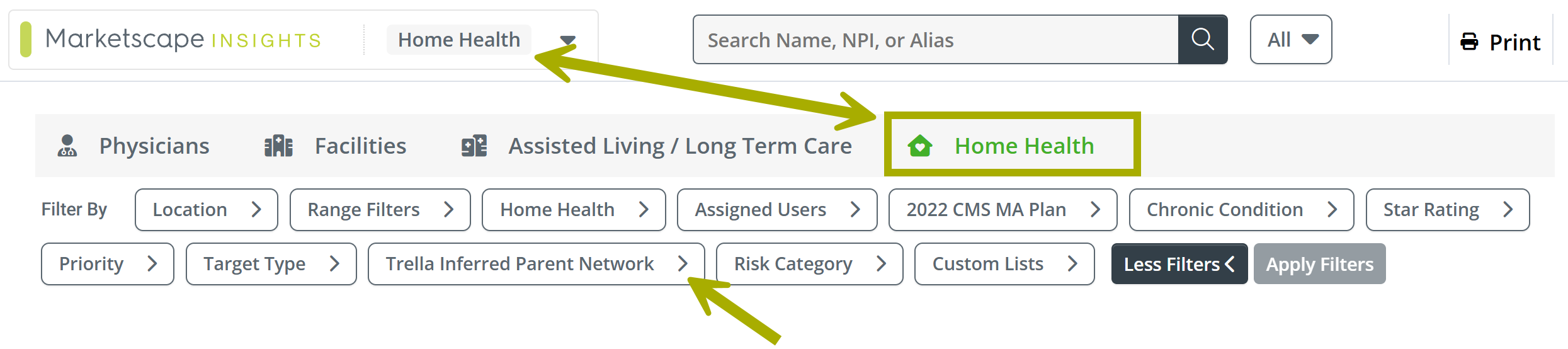
- Click on the "Trella Inferred Parent Network" filter to open it
|
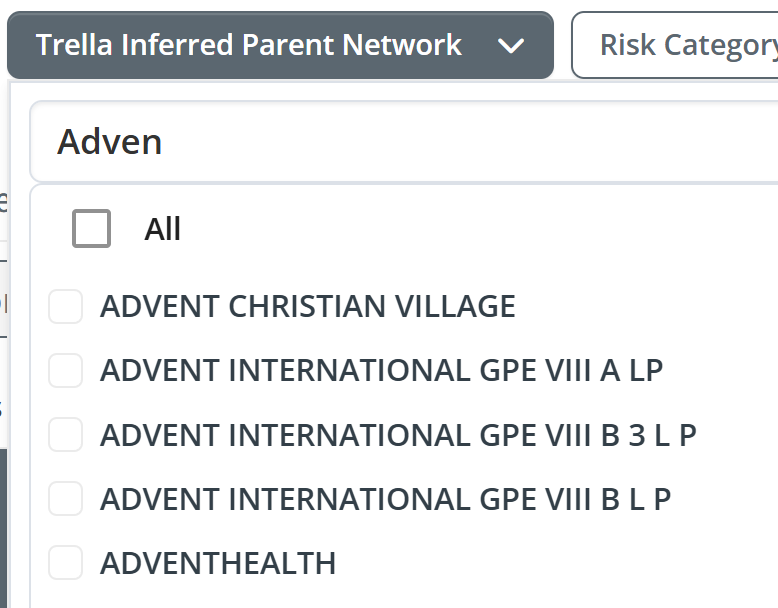
The Trella Inferred Parent Network filter dropdown will open. It contains a list of all TIPN networks identified by Trella Health in your contracted state(s). You can browse the list, but there are a lot of entries. (potentially) If you want to view providers for a specific TIPN, you can type the name into the filter search field and matching names will appear in the list.
|
 |
|
 |
The Explore page table will display entries aligned with the TIPN or TIPNs selected in the filter.
Explore page TIPN metric
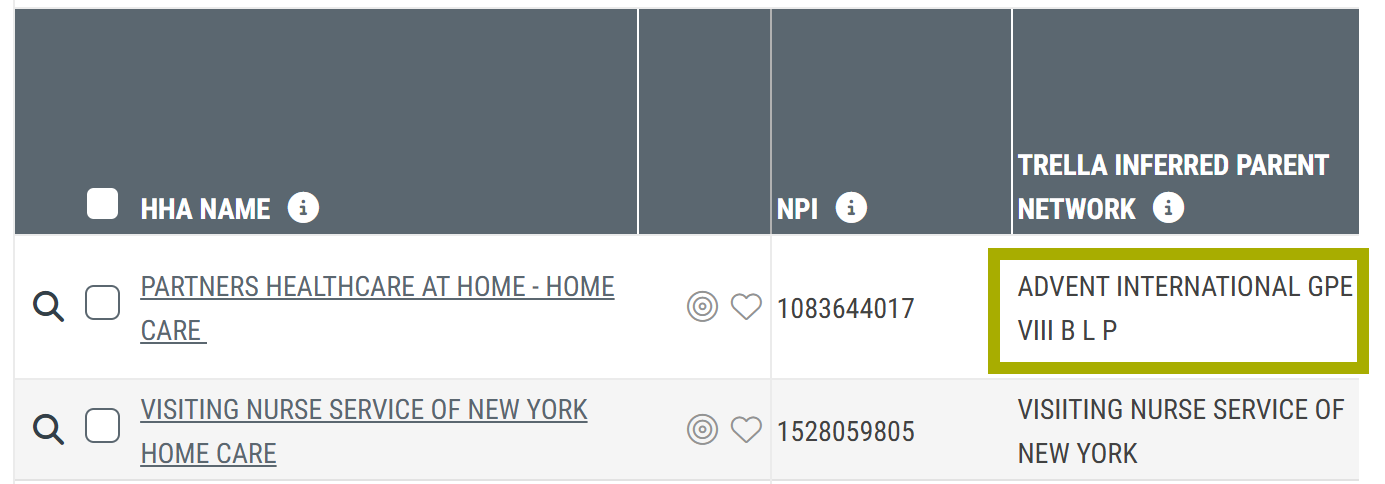
The definition for the Trella Inferred Parent Network column is, "A corporate parent entity for a collection of NPI's that has been identified by Trella as an owner, operator, or manager of multiple healthcare providers, using CMS Ownership data in addition to other data sources."
|
Hospice
In Trella Insights for Hospice, click on the Hospices tab to open the Hospice Explore page. The double arrow in the image below shows what you should see to confirm that you are in Trella Insights for Hospice and the tab to click to open the correct page.
TIPN Filter
|
On the Hospices Explore page, you will be able to find the TIPN filter. By default, only the two most used filters are visible.
|
|
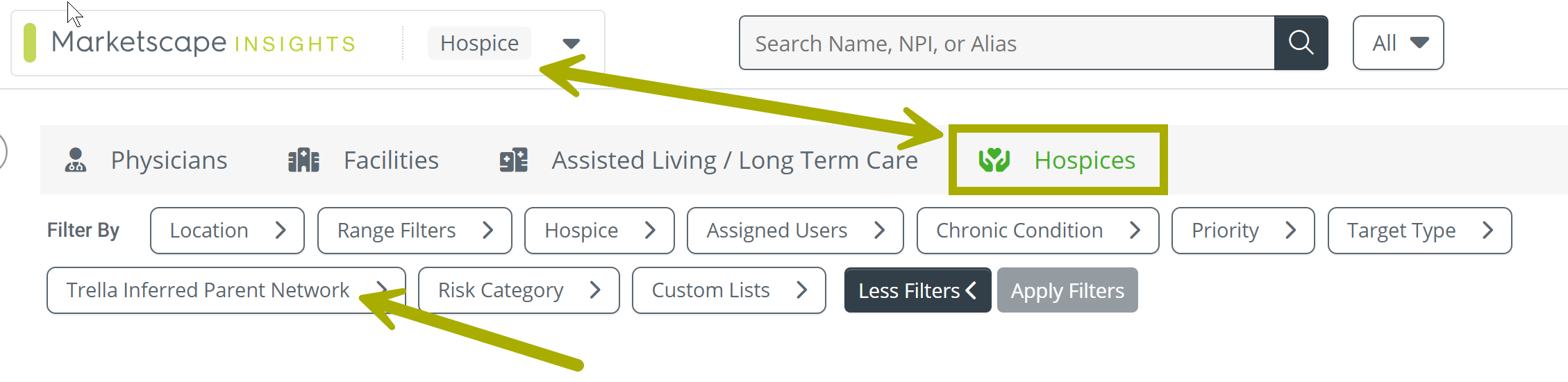
- Click on the "Trella Inferred Parent Network" filter to open it
|
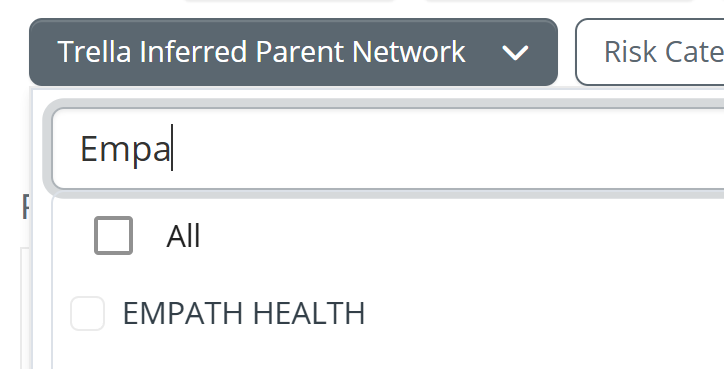
The Trella Inferred Parent Network filter dropdown will open. It contains a list of all TIPN networks identified by Trella Health in your contracted state(s). You can browse the list, but there are a lot of entries. (potentially) If you want to view providers for a specific TIPN, you can type the name into the filter search field and matching names will appear in the list.
|
 |
|
|
The Explore page table will display entries aligned with the TIPN or TIPNs selected in the filter.
Explore page TIPN metric
The definition for the Trella Inferred Parent Network column is, "A corporate parent entity for a collection of NPI's that has been identified by Trella as an owner, operator, or manager of multiple healthcare providers, using CMS Ownership data in addition to other data sources."
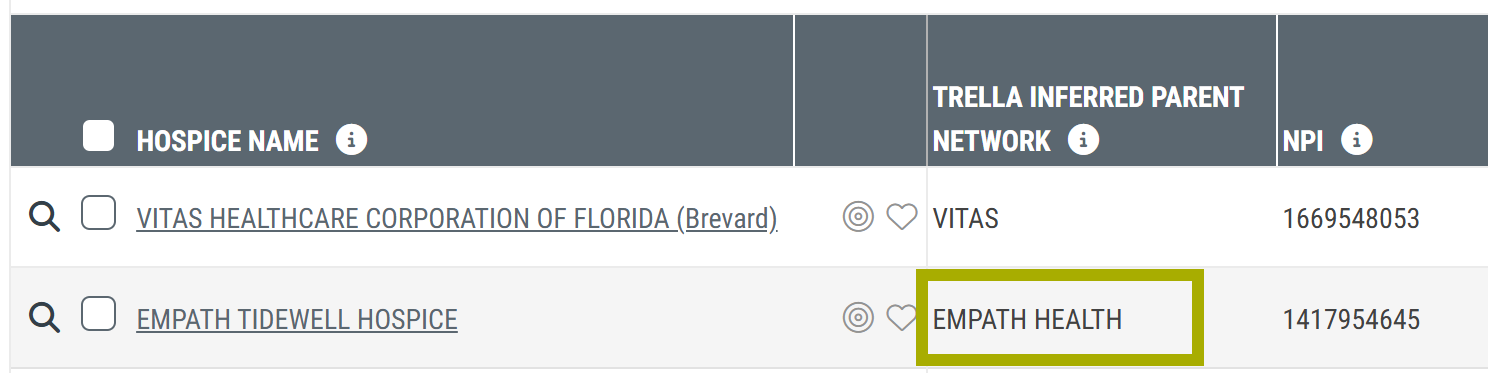
A corporate parent entity for a collection of NPI's that has been identified by Trella as an owner, operator, or manager of multiple healthcare providers, using CMS Ownership data in addition to other data sources.
|
Skilled Nursing
In Trella Insights for Skilled Nursing, click on the Skilled Nursing tab to open the Skilled Nursing Explore page. The double arrow in the image below shows what you should see to confirm that you are in Trella Insights for Skilled Nursing and the tab to click to open the correct page.
TIPN Filter
|
On the Hospices Explore page, you will be able to find the TIPN filter. By default, only the two most used filters are visible.
|
|
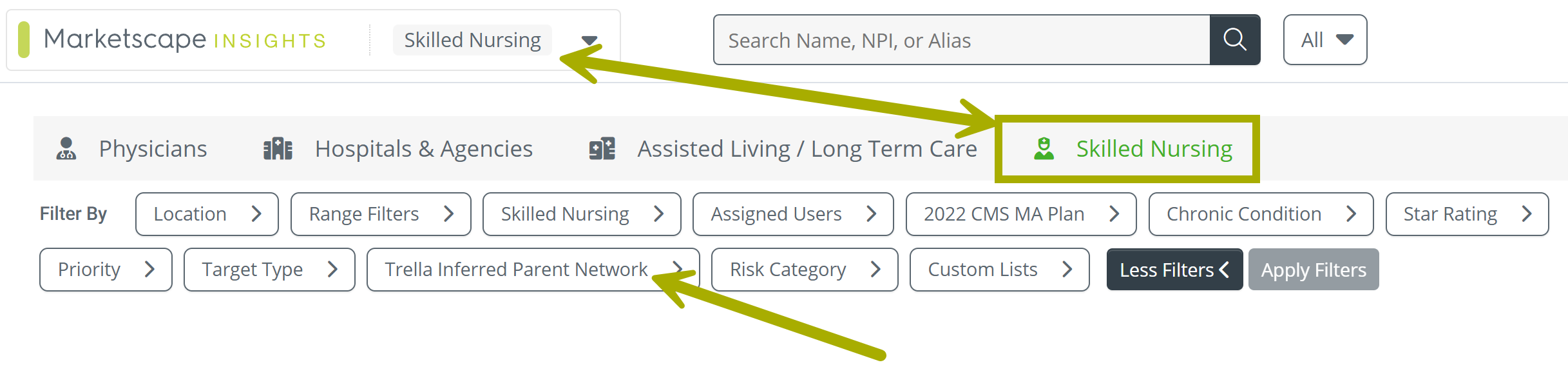
- Click on the "Trella Inferred Parent Network" filter to open it
|
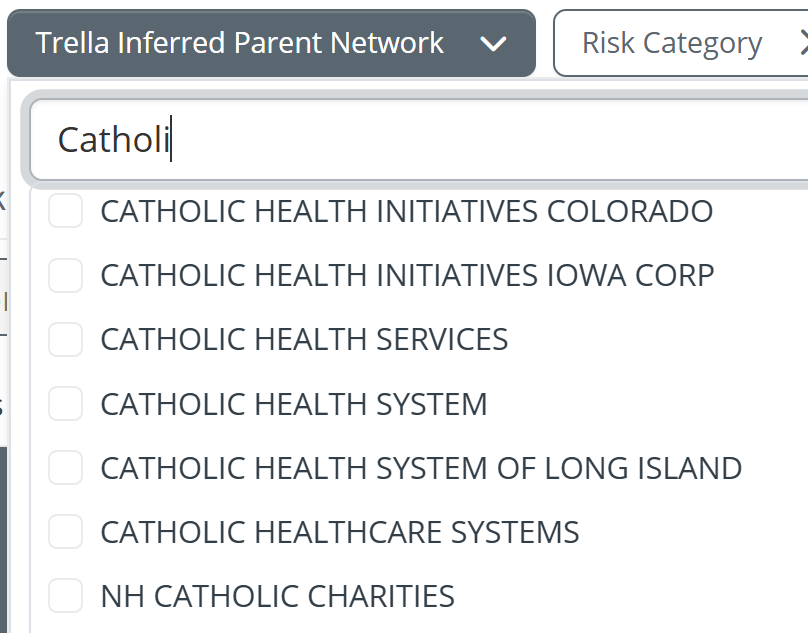
The Trella Inferred Parent Network filter dropdown will open. It contains a list of all TIPN networks identified by Trella Health in your contracted state(s). You can browse the list, but there are a lot of entries. (potentially) If you want to view providers for a specific TIPN, you can type the name into the filter search field and matching names will appear in the list.
|
 |
|
|
Explore page TIPN metric
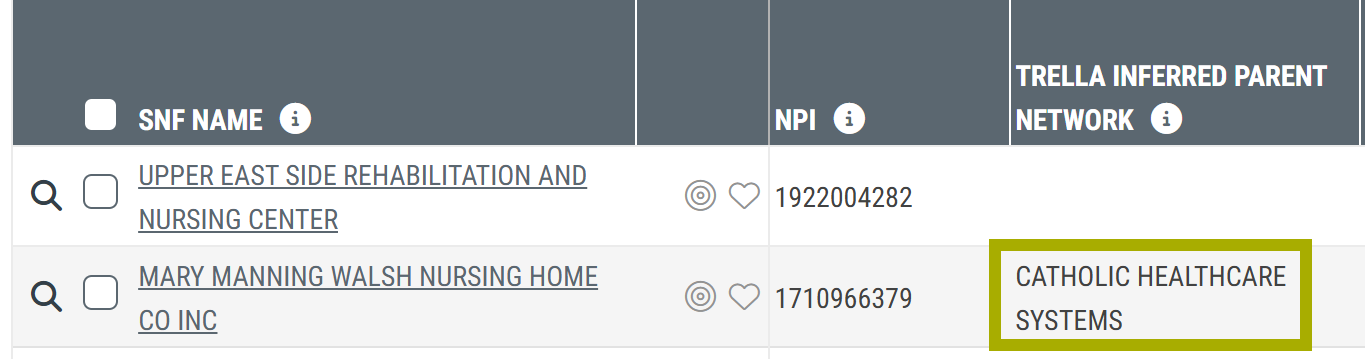
The definition for the Trella Inferred Parent Network column is, "A corporate parent entity for a collection of NPI's that has been identified by Trella as an owner, operator, or manager of multiple healthcare providers, using CMS Ownership data in addition to other data sources."
|
Market Share Report page
| The Market Share report is found on the Reports page in Trella Insights for Home Health, Hospice, and Skilled Nursing. |  |
 Reminder! The Reports page includes five possible tables:
- State (or County) Totals
- Medicare FFS - State Market Share with Trella Inferred Parent Networks
- Medicare FFS - State (or County) Market Share
- Medicare Advantage State (or County) Totals - not in Trella Insights for Hospice
- Medicare Advantage - State (or County) Market Share - not in Trella Insights for Hospice
 You are able to choose whether the tables show State or County metrics.
Trella Inferred Patient Network
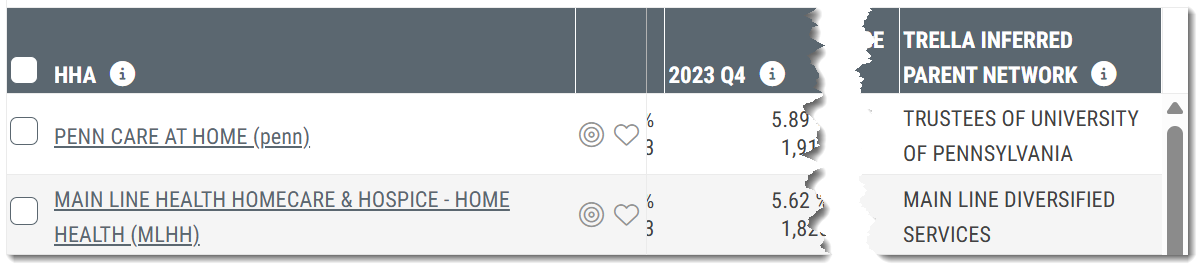
The state/county "Market Share" tables mentioned above are populated with home health agencies, hospices, or skilled nursing facilities, depending upon which module of Trella Insights you are viewing. In those Market Share tables, the Trella Inferred Parent Network column will be displayed. The Trella Inferred Network listed in each row aligns with the agency/hospice/facility listed in the left most column.
The image below was taken from Trella Insights for Home Health. The TIPN column will appear the same on the Market Share Reports page for all lines of business.
Medicare FFS - State Market Share with Trella Inferred Parent Networks
This table shows two types of organizations:
- Trella Inferred Parent Networks
- Home health agencies, skilled nursing facilities, or hospices - depending on which version of Trella Insights you are viewing. For simplicity sake, we will call these "individual organizations" in contrast to the Networks.
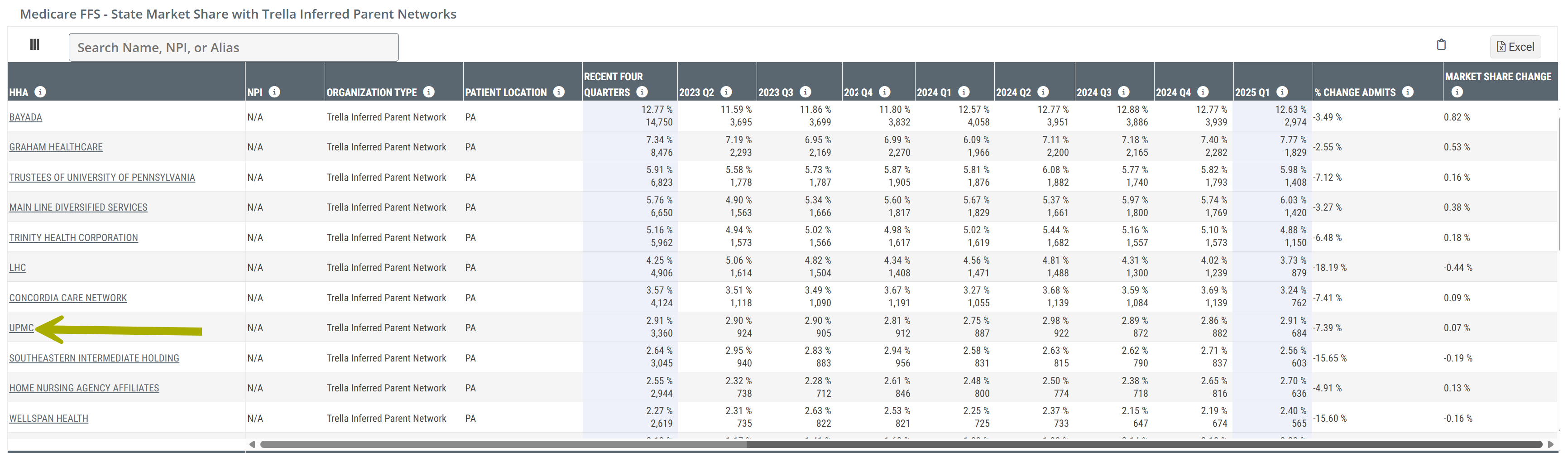
This table shows market share metrics for Trella inferred parent networks and any individual organizations that are not identified with a TIPN. The two metrics shown for each time period listed in the header are the market share percentage and the patient count. For example, if you look at the first row for the TIPN Bayada, the market share percentage for the selected state is 12.77% for patient counts in the most recent four quarters. The percentage is based on the patient count of 14,750 patients.
 Value
Value
In short, this table allows you to see which networks hold the greatest control of the market, based on a state or county you choose. Because networks collaborate, this shows the aggregated strength of a competitor rather than the market share for each individual organization separately. You are still able to see individual organizations broken out in the next table on the Market Share report page - Medicare FFS - County or State Market Share.
TIPN Analyze page
The name of every TIPN is a link to the Analyze page for that TIPN. The arrow in the image (above) is included as a reminder that clicking on the name will open the TIPN Analyze page for the selected TIPN. The links to the TIPN Analyze pages are below.
 For more information about the Market Share Reports page for each listed line of business:
- Trella Insights for Home Health - Market Share
- Trella Insights for Hospice - Market Share
- Trella Insights for Skilled Nursing - Market Share
For details on the TIPN Analyze page, use the links below.
- TIPN Analyze in Trella Insights for Home Health
- TIPN Analyze in Trella Insights for Hospice
- TIPN Analyze in Trella Insights for Skilled Nursing
Final Note: The TIPN listed for any agency/hospice/facility in any of the Market Share Tables will match the TIPNs shown in the Explore page main table.
|
Other Analyze page locations
In short, we have identified the Trella Inferred Patient Network for organizations listed in many tables on different Analyze pages. The locations of these tables are listed below by line of business and provider type.
If you open the Analyze page for any organization aligned with a TIPN, the TIPN ID of the associated TIPN is displayed in the Provider Information panel at the top of the page. (See image.)
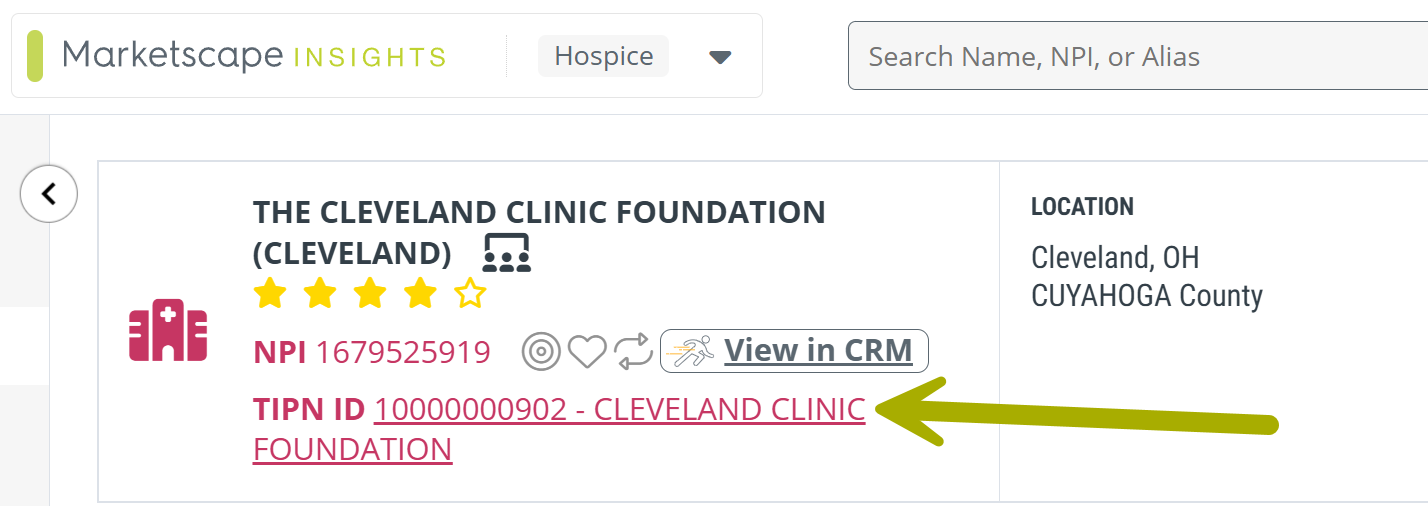
The TIPN ID is a link to the TIPN Analyze page.
Jump directly to the TIPN metric locations for a specific line of business.
Trella Insights for Skilled Nursing
Physician Analyze page
Under the Destinations tab, TIPNs are identified for entries in the following tables:

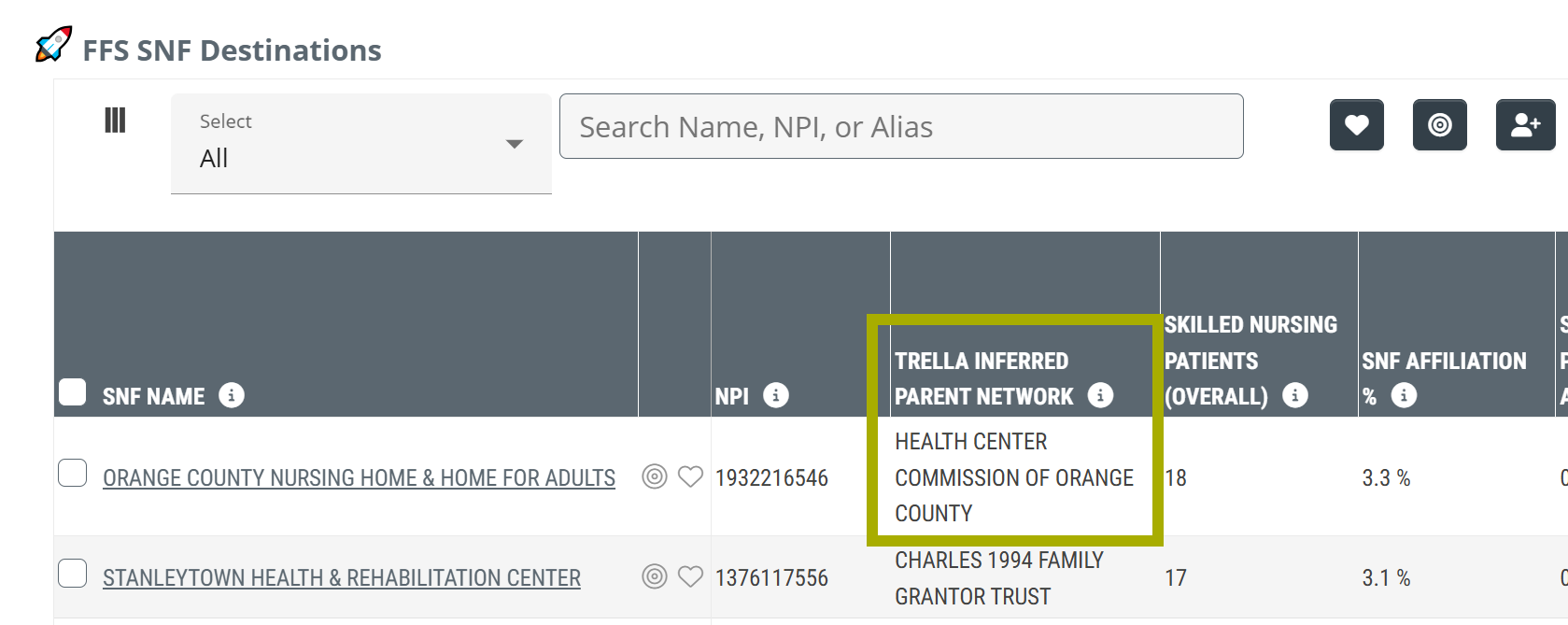
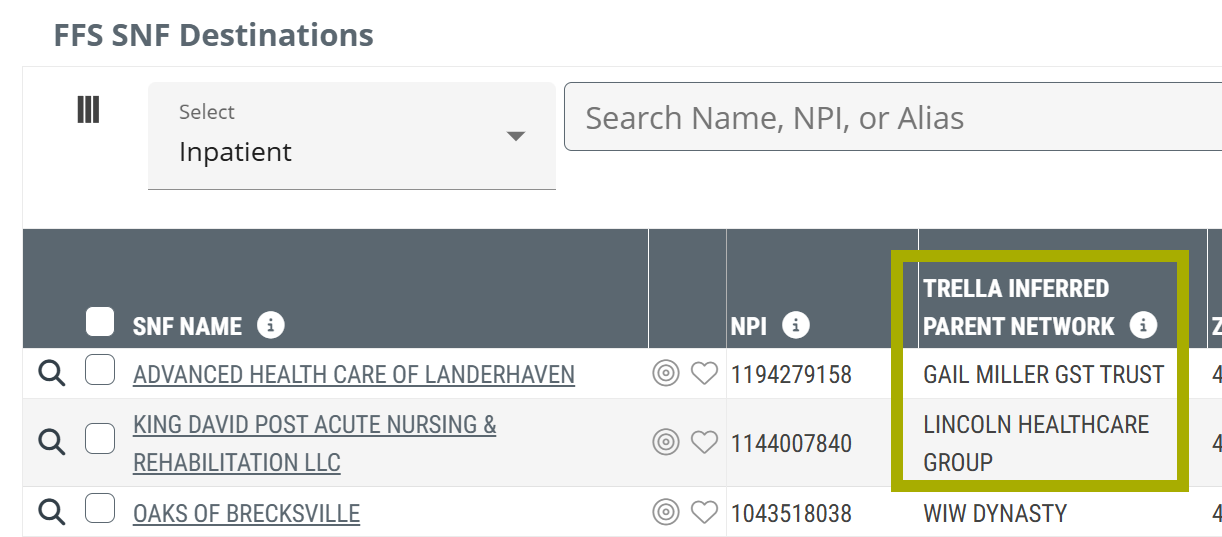
- FFS SNF Destinations table - the Trella Inferred Parent Network column identifies associated TIPNs for skilled nursing facility destinations shown in the table.
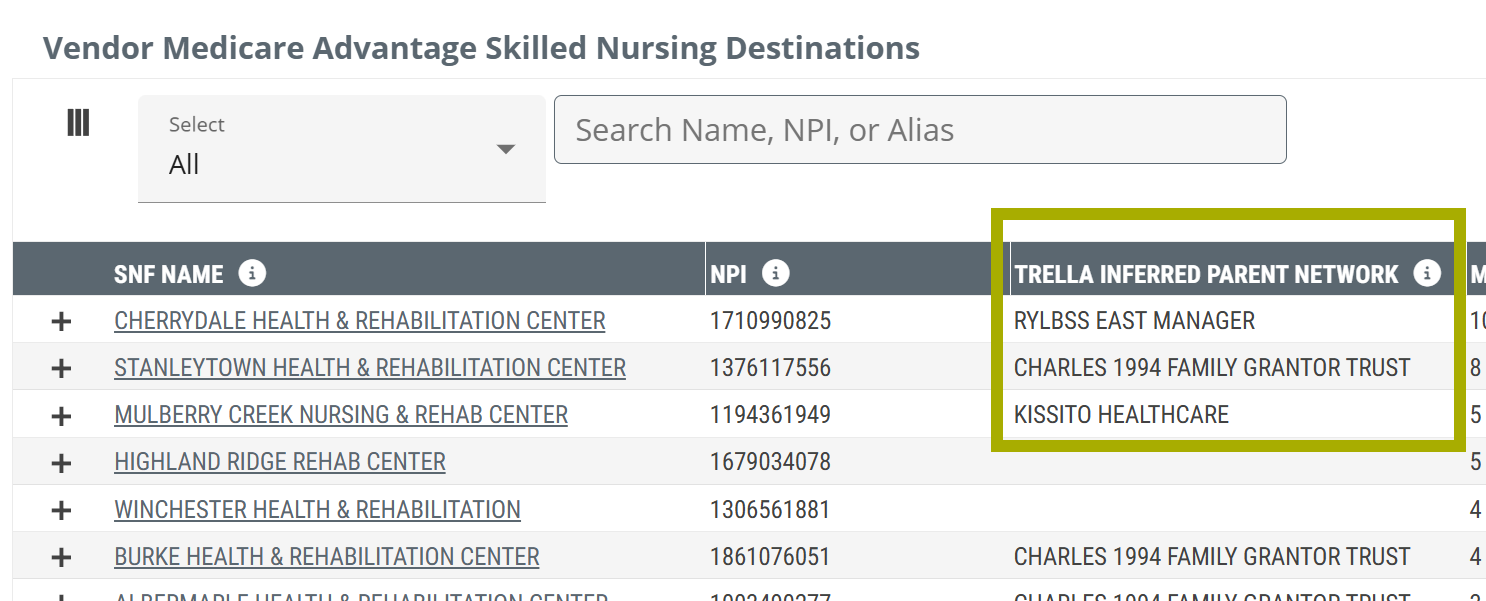
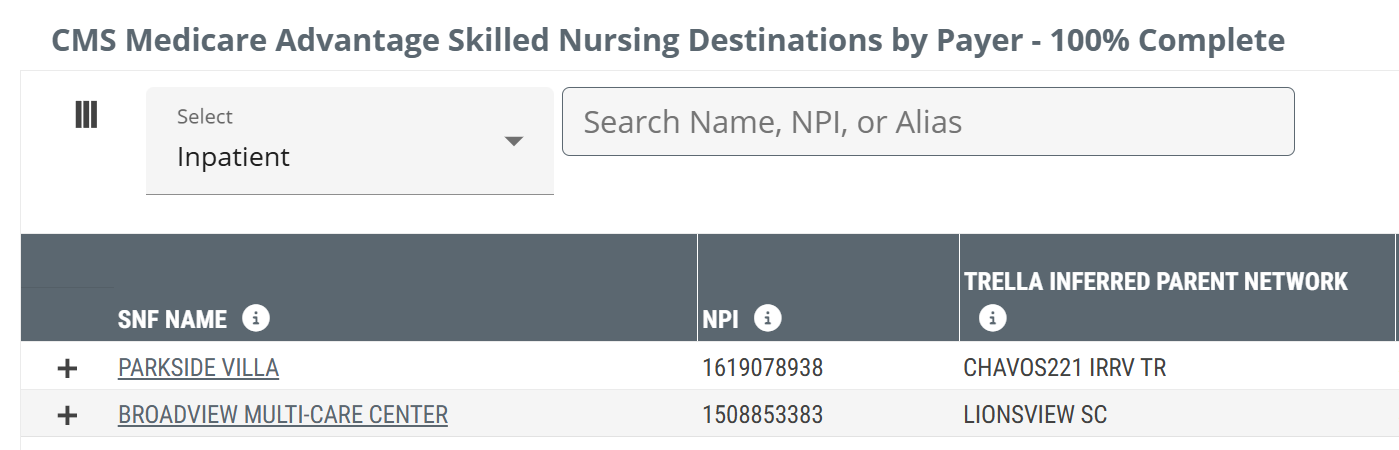
- Vendor Medicare Advantage Skilled Nursing Destinations table - The Trella Inferred Parent Network column shows the name of the TIPN associated with each skilled nursing destination displayed in the table.
Hospital & Agency Analyze page
Under the Destinations tab, TIPNs are identified for entries in the following tables:

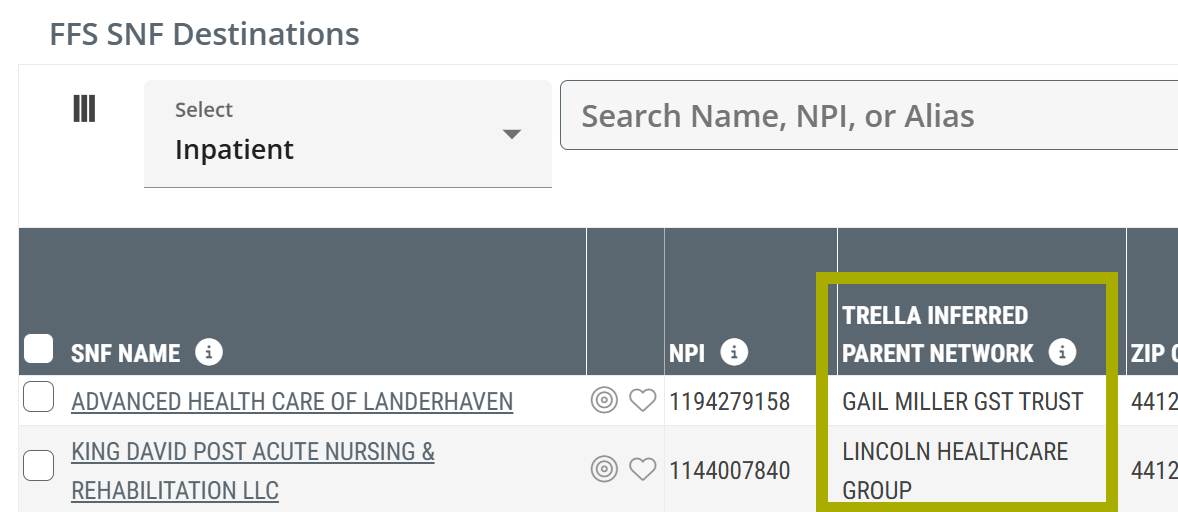
- FFA SNF Destinations table - For each listed skilled nursing destination, the associated TIPN is listed in the Trella Inferred Network column
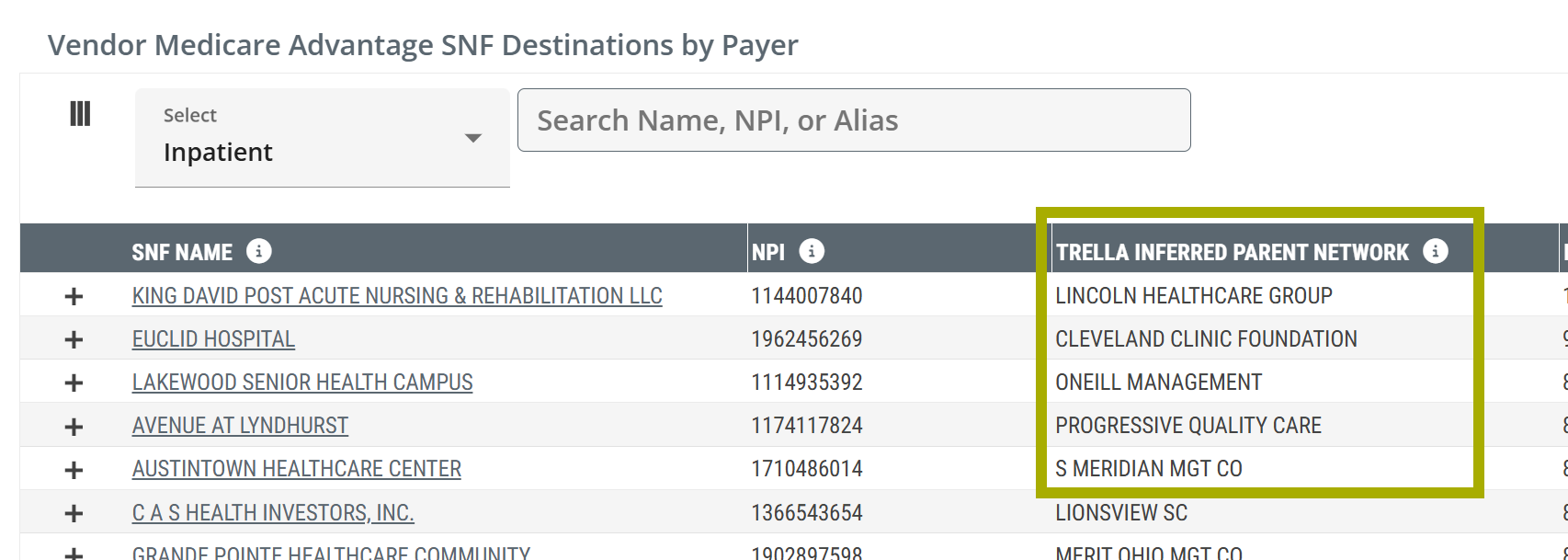
- Vendor Medicare Advantage SNF Destinations by Payer table - The TIPN ID aligned with each listed skilled nursing facility is shown in the Trella Inferred Parent Network column
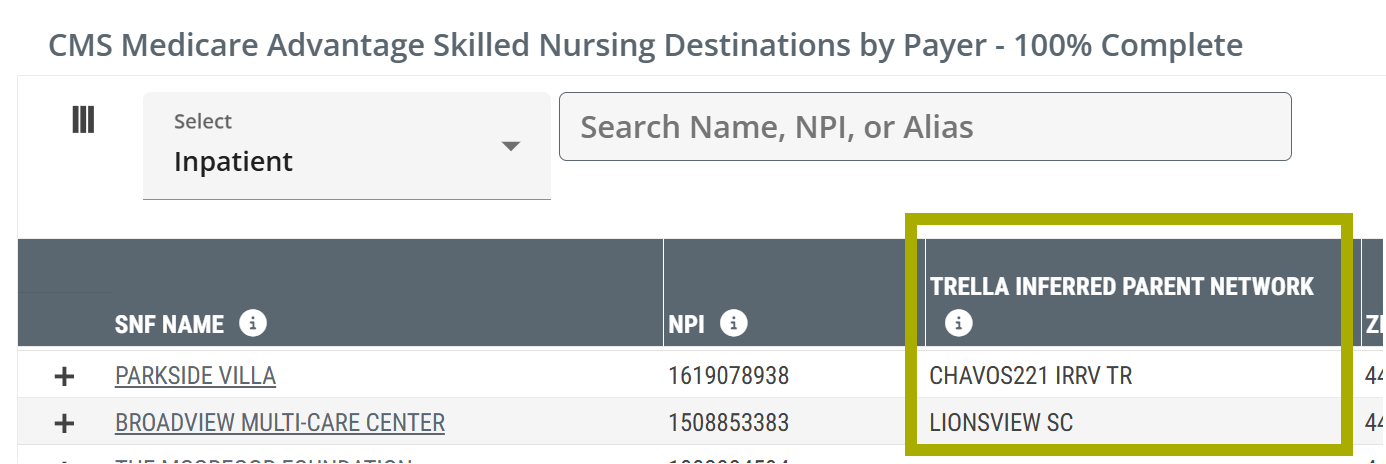
- CMS Medicare Advantage Skilled Nursing Destinations by Payer - 100% Complete table - The Trella Inferred Parent Network column shows the name of the TIPN associated with each skilled nursing destination displayed in the table.
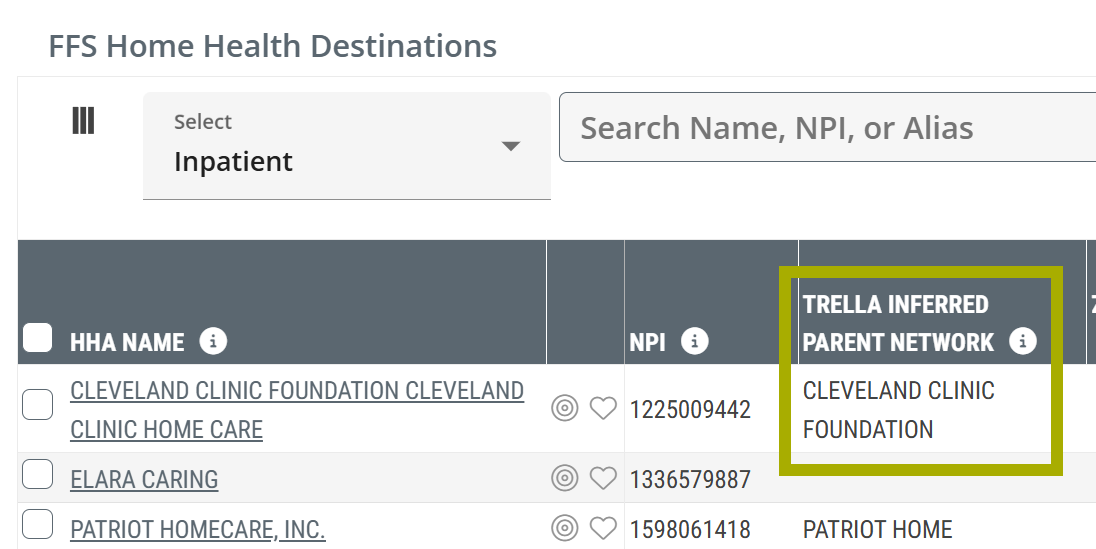
- FFS Home Health Destinations table - For each listed home health agency the associated TIPN is identified in the column, Trella Inferred Parent Network
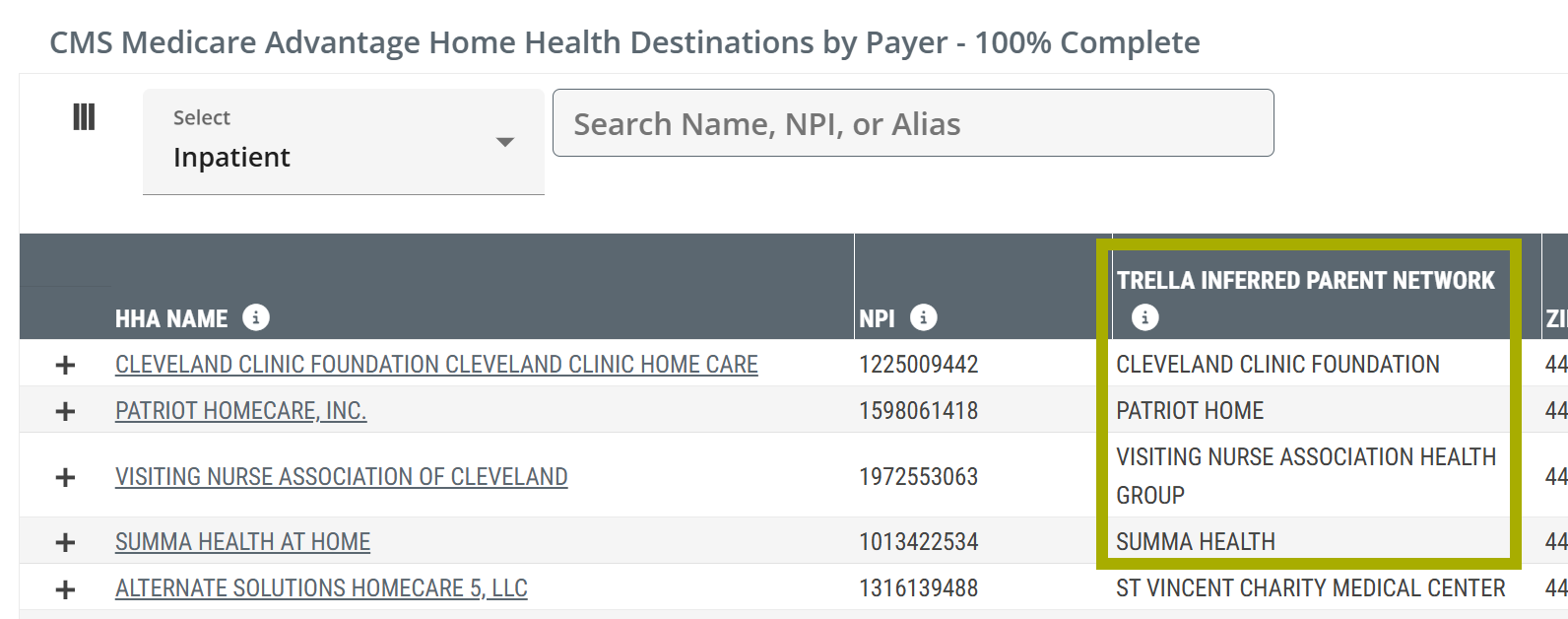
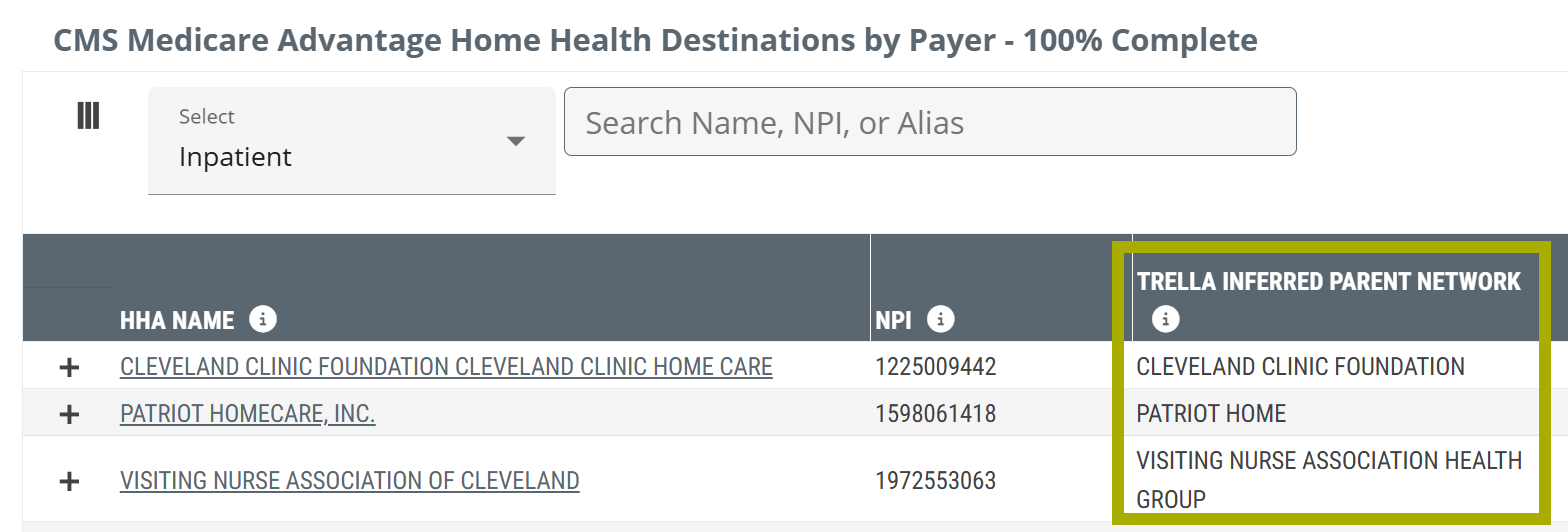
- CMS Medicare Advantage Home Health Destinations by Payer table - The Trella Inferred Parent Network column shows the name of the TIPN associated with each home health agency destination listed in the table
|
Trella Insights for Home Health
Physician Analyze page
Under the Destinations tab, TIPNs are identified for entries in the following tables:
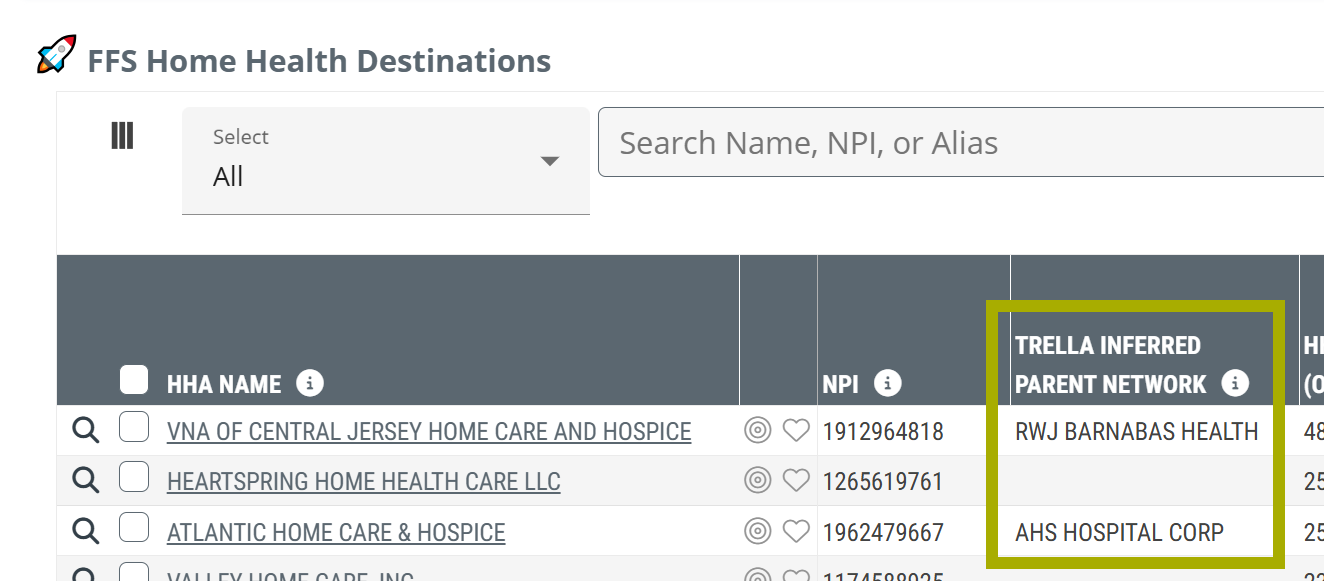
- FFS Home Health Destinations table - For each listed home health agency, the associated TIPN is identified in the column, Trella Inferred Parent Network
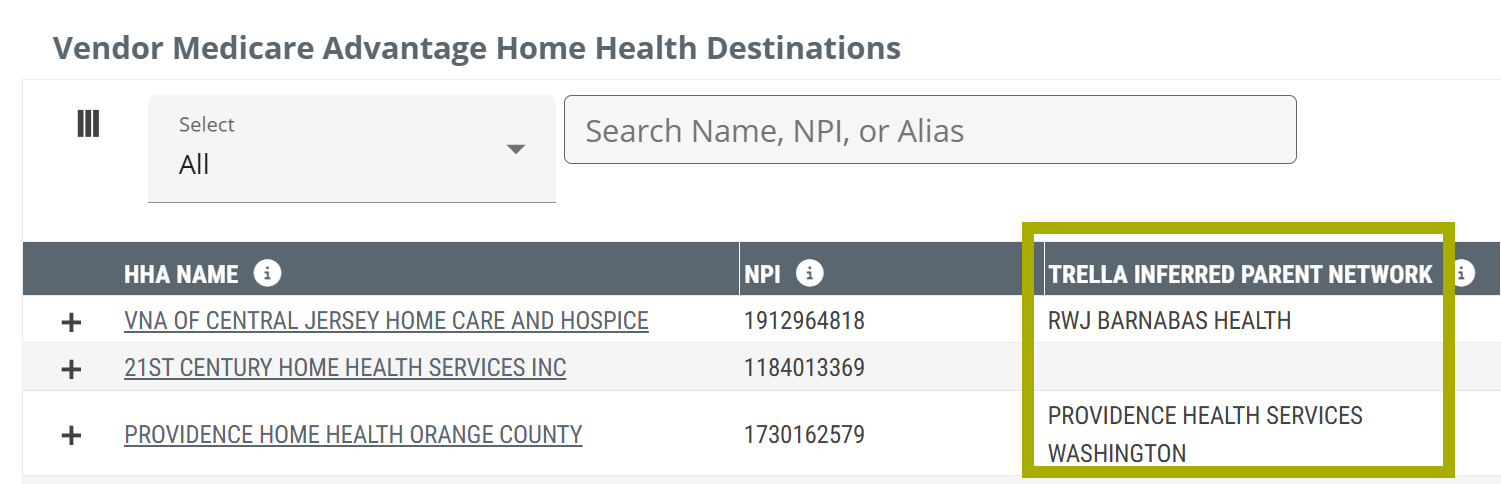
- Vendor Medicare Advantage Home Health Destinations table - The Trella Inferred Parent Network column shows the name of the TIPN associated with each home health agency destination displayed in the table
Facility Analyze page
Under the Destinations tab, TIPNs are identified for entries in the following tables:
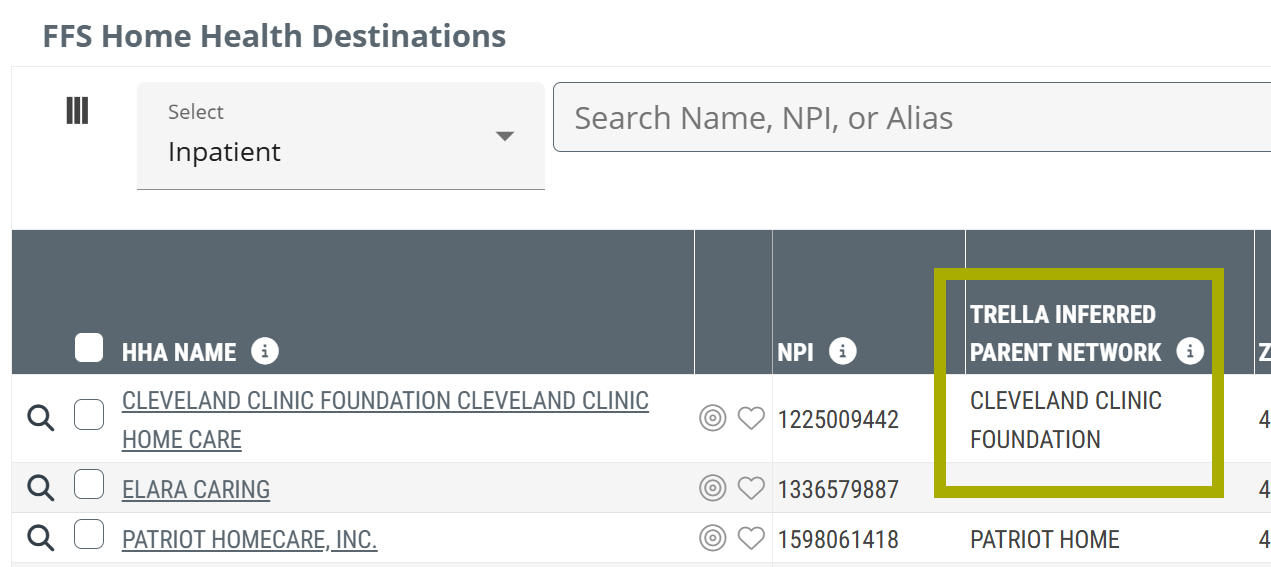
- FFS Home Health Destinations table - For each listed home health destination, the associated TIPN is listed in the Trella Inferred Network column
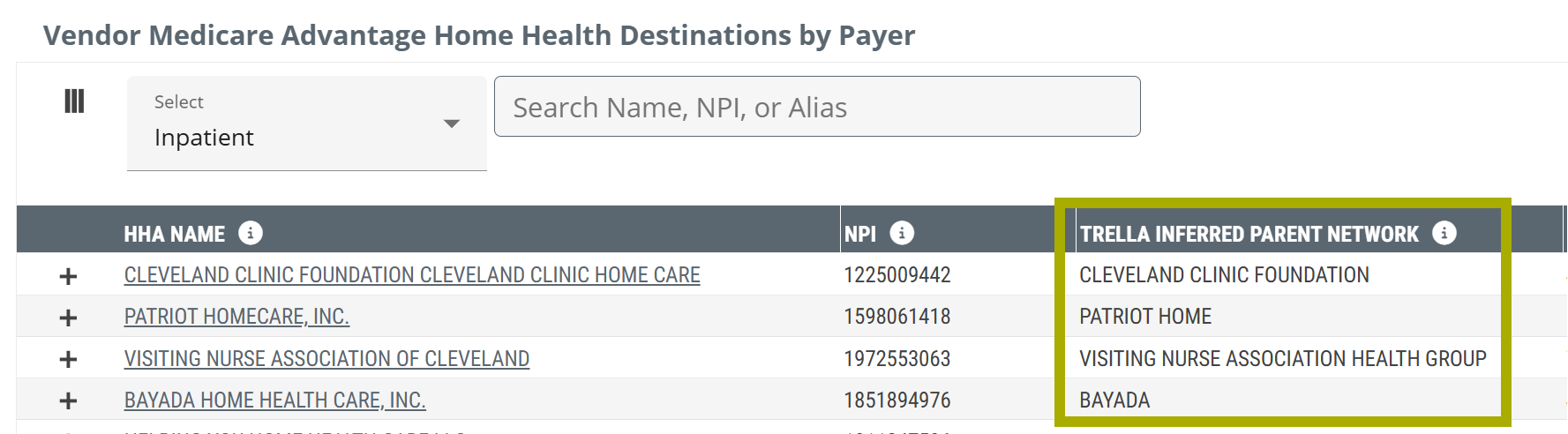
- Vendor Medicare Advantage Home Health Destinations by Payer table - The Trella Inferred Parent Network column shows the name of the TIPN associated with each home health agency destination displayed in the table
- CMS Medicare Advantage Home Health Destinations by Payer - 100% Compete table - The Trella Inferred Parent Network column shows the name of the TIPN associated with each home health destination listed in the table.
- FFS SNF Destinations table - For each listed skilled nursing facility the associated TIPN is identified in the column, Trella Inferred Parent Network
- CMS Medicare Advantage Skilled Nursing Destinations by Payer - 100% Complete table - The Trella Inferred Parent Network column shows the name of the TIPN associated with each skilled nursing destination listed in the table.
|
Trella Insights for Hospice
Physician Analyze page
Under the Destinations tab, TIPNs are identified for entries in the following tables:
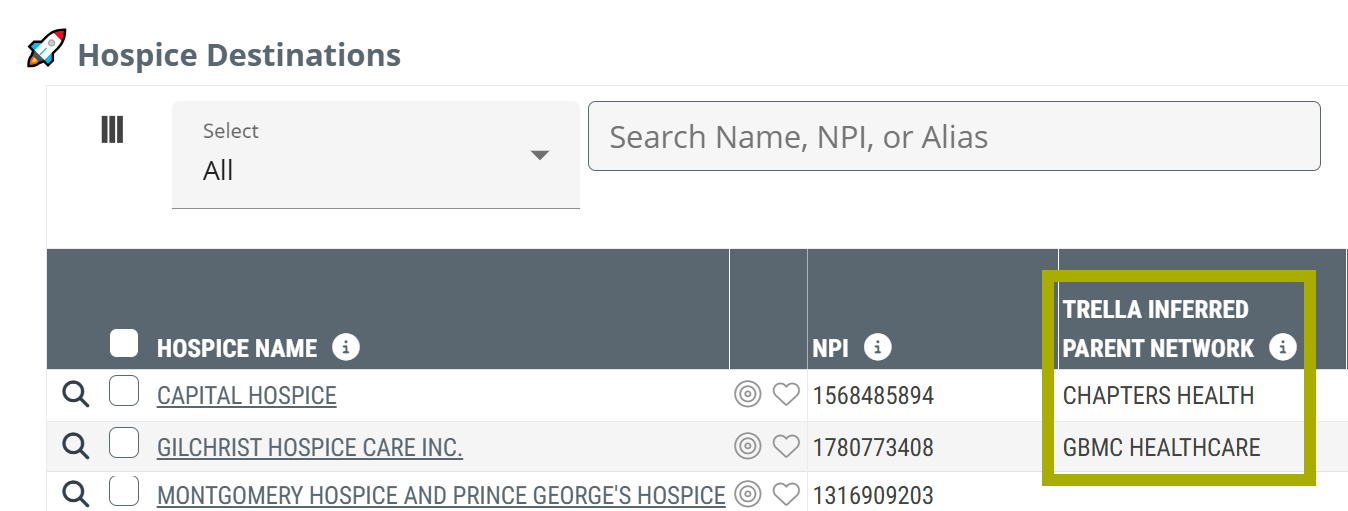
- Hospice Destinations table - For each listed hospice, the associated TIPN is identified in the column, Trella Inferred Parent Network
Facility Analyze page
Under the Destinations tab, TIPNs are identified for entries in the following tables:
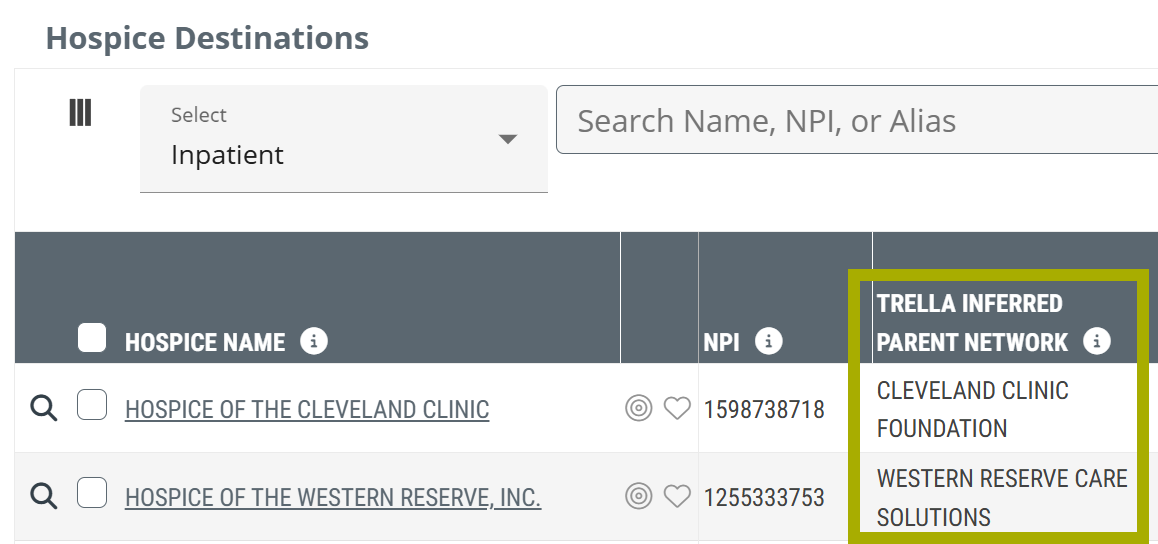
- Hospice Destinations - The Trella Inferred Parent Network column shows the name of the TIPN associated with each hospice destination displayed in the table
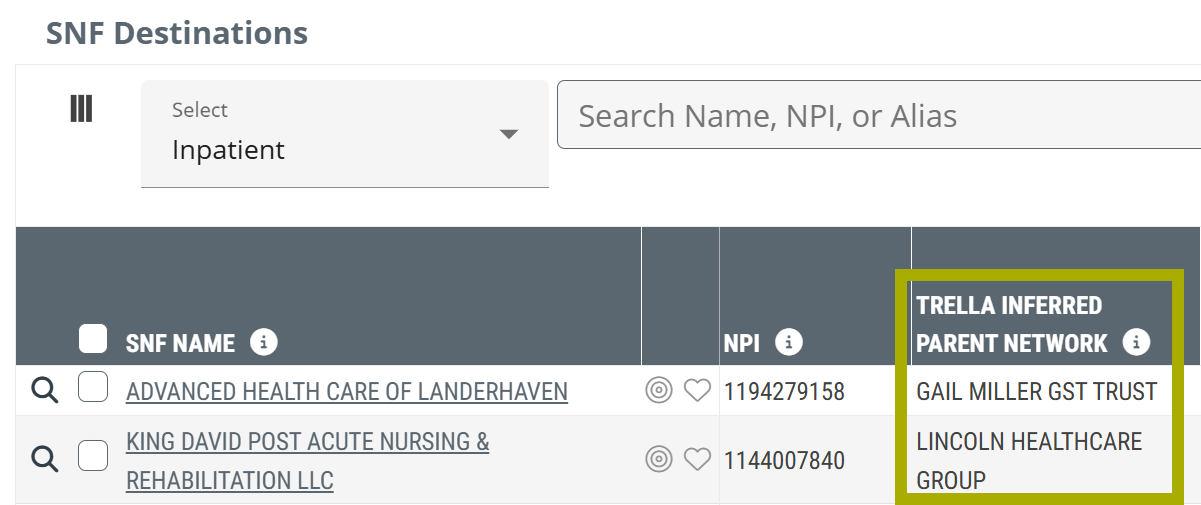
- SNF Destinations - The Trella Inferred Parent Network column displays the TIPN associated with the skilled nursing facility listed in each row
|